



Entity Pools LITE+
A rendering primitive for collections of reactive entities. Each pool holds many entities of the same shape; data-pool keeps their DOM in sync with a single batch flush per frame. Entities use the same unified entity model as components, stores, and plugins.
state, computed, and methods the same way components, stores, and plugins do. See Defining an entity below. What makes pools different is multiplicity, reactivity mode, and timing: a pool holds many entities of one shape (keyed by id), entity state is plain JS rather than Proxy-tracked, and the pool syncs the DOM in one batch each animation frame instead of on every property mutation.
data-list. It's the right default. Reach for data-pool when you need more performance, explicit control over what updates, or high-frequency rendering (real-time data, animation, games). For items that need two-way binding (data-model) or nested lists, use data-list.
New to pools? Read Why Pools? to understand why WildflowerJS offers two reactivity modes and how they compare.
The Unified Entity Model
A WildflowerJS entity — whether it's a component, a store, a plugin, or a pool — declares the same four things: state, computed, methods, and lifecycle hooks. The shape is identical; only the scope and binding differ. (For pools, the four things live inside the pool's entity block, since one pool holds many items.)
wildflower.component('counter', {
    state: { count: 0 },
    computed: {
        doubled() { return this.count * 2; }
    },
    increment() { this.count++; },
    init() { /* lifecycle */ }
})wildflower.store('cart', {
state: { items: [] },
computed: {
total() { return this.items.length; }
},
add(item) { this.items.push(item); },
init() { /* lifecycle */ }
})wildflower.plugin('timer', {
state: { elapsed: 0 },
computed: {
seconds() { return this.elapsed / 1000; }
},
reset() { this.elapsed = 0; },
init() { /* lifecycle */ }
})pools: {
enemies: {
entity: {
state: { hp: 100 },
computed: {
isDead() { return this.hp <= 0; }
},
takeDamage(n) { this.hp -= n; }
}
}
}What distinguishes pools from the other three:
- Multiplicity. A component, store, or plugin is declared once and has one instance (or one instance per mounted element). A pool holds many items of the declared
entityshape — spawn, key, render, remove — with oneentityblock defining all of them. Those items are also called pool entities, and they share the pool's single reactive context rather than each getting one of their own. - Reactivity mode. Component, store, and plugin state is wrapped in a reactive Proxy. Every property mutation is observed, and dependent computed properties and bindings update immediately. Pool entity state is plain JavaScript: mutations aren't tracked. The pool re-reads entity values on each flush and writes only what changed. This is why pools scale to thousands of entities without per-property overhead.
- Timing. Push vs pull. Component bindings update synchronously when state changes. Pool bindings update in a single batched DOM write per animation frame.
Two Kinds of Reactivity
WildflowerJS offers two reactive rendering modes. Both are declarative; you describe what the DOM should look like, and the framework keeps it in sync. The difference is timing:
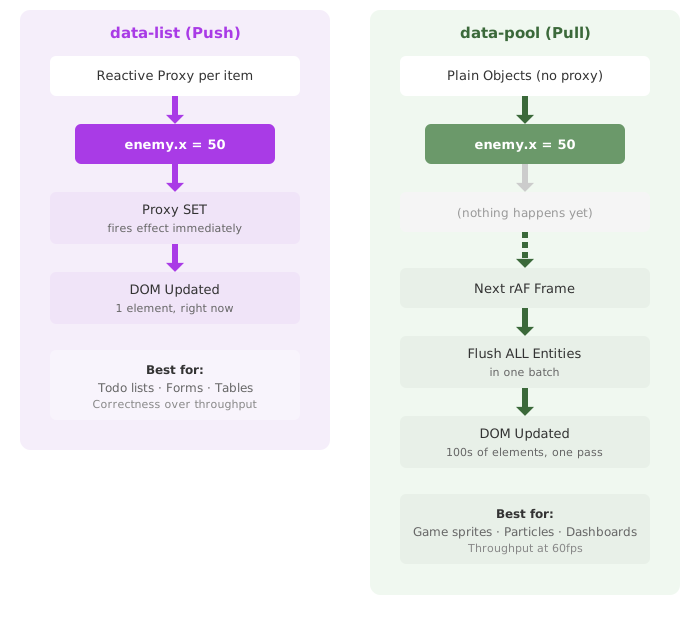
data-list(push-based): the framework watches for property changes via Proxy and updates the DOM immediately. Best for correctness-critical UI where every state change should reflect instantly.data-pool(pull-based): the framework reads the current state of all entities each animation frame and syncs the DOM in a single batch. Best for throughput-critical scenarios where many entities change simultaneously.
Both use the same template bindings (data-bind, data-bind-style, data-bind-class, data-bind-attr, data-show). Both manage entity lifecycles automatically. The developer picks the right mode for the job.
data-list |
data-pool |
|
|---|---|---|
| Reactivity | Push-based (Proxy per property) | Pull-based (rAF batch flush) |
| Items | Reactive proxy objects | Plain JS objects |
| Updates | Immediate on mutation | Batched per animation frame |
| Template scope | Full component context (state, computed, stores) | Entity properties + shared props |
| Two-way binding | Yes (data-model) |
No |
| Actions | Yes (data-action) |
Yes (data-action via event delegation) |
| Use case | Interactive collections (forms, inline editing, two-way binding) | Performance-sensitive CRUD, real-time data, large datasets, per-frame animation |
Basic Usage
A DOM-rendered pool needs three things: a container element with data-pool, a data-key attribute identifying the unique property, and a <template> child defining each entity's DOM structure. Pools declared in a pools: {} block without a matching DOM element work as headless data collections, useful in stores or components that feed data to other parts of the UI.
HTML Template
<div data-component="particle-demo">
    <button data-action="spawn">Spawn Particle</button>

    <div class="world" data-pool="particles" data-key="id">
        <template>
            <div class="particle"
                 data-bind-style="{ left: x + 'px', top: y + 'px', opacity: alpha }">
            </div>
        </template>
    </div>
</div>
JavaScript
wildflower.component('particle-demo', {
    state: { nextId: 1 },

    // Declare pools alongside state: the framework sets them up automatically
    pools: { particles: {} },

    spawn() {
        this.pools.particles.add({
            id: this.nextId++,
            x: Math.random() * 400,
            y: Math.random() * 300,
            alpha: 1,
            vy: -2 - Math.random() * 3
        });
    },

    // tick(dt) is called automatically each animation frame.
    // dt = milliseconds since last frame. Physics runs here; pool flush happens right after.
    tick(dt) {
        var t = dt / 16.67; // normalize: t≈1.0 at 60fps
        for (const p of this.pools.particles.items) {
            p.y += p.vy * t;
            p.alpha -= 0.01 * t;
        }
        // Remove dead particles
        for (let i = this.pools.particles.items.length - 1; i >= 0; i--) {
            if (this.pools.particles.items[i].alpha <= 0) {
                this.pools.particles.remove(this.pools.particles.items[i].id);
            }
        }
    }
});props.* values (see Pool Props). Component state, computed properties, and store values are not directly available. Use pool.props to pass shared data into the template. This keeps items free of per-item Proxy overhead.
Defining an Entity
The minimal pool above treats entities as plain objects, useful for pure data passthrough. For richer pools, the entity block inside a pool definition declares the entity's shape: state, computed, and methods. This is the same shape components, stores, and plugins use.
pools: {
    enemies: {
        entity: {
            // Default state merged into every new entity at add() time.
            // Spawn-provided values always win over these defaults.
            state: {
                hp: 100,
                maxHp: 100,
                eState: 'follow'
            },

            // Per-entity derived values. Recomputed on every read (no cache).
            // `this` is the entity.
            computed: {
                isDead()   { return this.hp <= 0; },
                hpPercent(){ return Math.round((this.hp / this.maxHp) * 100); }
            },

            // Methods at the top level of the entity block. `this` is the entity.
            // Auto-routed when data-action names them (falls back to the
            // component method if the entity doesn't define one).
            takeDamage(n) {
                this.hp -= n;
                if (this.hp <= 0) this.eState = 'dying';
            }
        }
    }
}entity.state: default values merged into new entities
Fields declared in entity.state are merged into every new entity at add() / push() time. The merge is shallow: spawn-provided values win, and any field the spawn omits is filled in from the template.
// With the enemies pool above:
pool.push({ id: 1 });
// Entity becomes: { id: 1, hp: 100, maxHp: 100, eState: 'follow' }

pool.push({ id: 2, hp: 250 });
// Entity becomes: { id: 2, hp: 250, maxHp: 100, eState: 'follow' }entity.computed: per-entity derived values
Functions declared in entity.computed become getters on each entity. They recompute on every read, with this bound to the entity. Template bindings (data-bind, data-bind-class, data-show, etc.) read computed names the same way they read plain property names.
<div data-pool="enemies" data-key="id">
    <template>
        <div data-bind-class="isDead ? 'enemy dying' : 'enemy'">
            HP: <span data-bind="hpPercent"></span>%
        </div>
    </template>
</div>
Computed properties recompute on every access; there is no cache. Entity mutations (including those from entity methods) are visible to the next binding read with no invalidation step.
60 μs per entity per flush (a function call plus whatever the expression does). For event-driven pools (todo lists, dashboards, turn-based state, anything that flushes tens to low-hundreds of entities on user actions) the cost is invisible and the declarative win is worth it.
For hot animation loops (hundreds of entities, 60 fps), that cost adds up fast: 800 entities × 60 fps × 60 μs is about 3 ms/frame. In those cases, prefer a plain data property that you assign at mutation time (e.g.
entity.cssClass = 'enemy dying' when you set eState = 'dying'). Use entity.computed when ergonomics matter more than microseconds; use data properties when microseconds matter more than ergonomics.
Entity methods: behaviors scoped to a single entity
Any function property on the entity block that isn't state or computed is an entity method. Methods are installed on every entity at add() time; this is the entity itself.
// Call directly on any entity
pool.get(1).takeDamage(25);

// Or via data-action inside the template, automatically routed to the
// entity method, with `this` bound to the clicked entity.
<button data-action="takeDamage">Hit</button>When both the component and an entity define a method with the same name, the entity's wins. Methods not defined on the entity fall back to component methods.
this bound to the entity at call time, so arrow functions are rejected at pool registration with a clear error. Use shorthand method syntax: takeDamage(n) { ... }, not takeDamage: (n) => { ... }.
Entity scope: what this can and can't reach
Inside an entity.computed getter or an entity method, this is the entity itself. The framework doesn't plumb additional context into that call site. Everything else you might use is ordinary JavaScript scope, not a framework accessor.
Reachable from an entity function:
this: the entity's own properties (fields set at spawn, defaults fromentity.state, installed computed, other entity methods)- Module-level variables and helper functions via normal lexical closure (constants, imported utilities, precomputed tables)
- The
wildflowerglobal, which exposes framework-level APIs such aswildflower.getStore('name'). Any function in your code can call it; there's nothing special about entity methods here.
Not reachable from an entity function:
- The pool handle. The entity doesn't carry a back-reference to its pool, so there's no way to call
pool.remove(this.id)from an entity method. Removal lives on the component. - Pool-level
props. Template bindings can readprops.X, but the pool doesn't inject a$propsor similar accessor into entity functions. - The parent component's
state,computed, methods, or other pools. The entity has nothis.parent, no inheritedthis.pools, nothing that reaches upward.
The isolation is a convention. A determined author can hold references to the pool or component in module-level variables and reach back in. The framework simply doesn't make such access part of the entity surface, which shapes a natural split: behavior that fits inside the entity goes in the entity; coordination that spans the pool or the rest of the app lives on the owning component. Decide by what the code is doing.
// Common pattern: entity-local mutation as entity method,
// pool-level coordination as a component method that entity actions
// fall through to when the entity doesn't define a match.

pools: {
    enemies: {
        entity: {
            state: { hp: 100 },
            takeDamage(n) {
                this.hp -= n;
                // Scoring is global, so reach the store directly.
                wildflower.getStore('stats').damageDealt += n;
            }
        }
    }
},

// Component method. Handles the things an entity method can't express
// cleanly. In this case, removing the entity from its pool.
removeEnemy(item) {
    this.pools.enemies.remove(item.id);
}
Pool API (array-like)
Pool handles expose a selected array-like surface: push, length, at(i), plus the read-only helpers find, filter, map, forEach, some, every, and reduce. Pools are also iterable. Entities are addressed by key, not by index, so methods like splice, pop, indexOf, and slice aren't exposed; they require stable index positions, which swap-with-last storage doesn't provide.
pool.push({ id: 1, hp: 10 });
pool.length;                     // 1
for (const enemy of pool) { ... }
pool.find(e => e.isDead);
pool.get(1).takeDamage(5);
pool.remove(1);
pool.at(0); // entity at DOM position 0 (stable)add, remove, and size are aliases for push, remove by key, and length. Both spellings have identical behavior and performance. Use whichever reads better in your code.
Template Bindings
Pool templates support these binding attributes, all operating on entity object properties:
| Attribute | Purpose | Example |
|---|---|---|
data-bind |
Text content | <span data-bind="label"></span> |
data-bind-style |
Inline styles (object expression) | data-bind-style="{ left: x + 'px', top: y + 'px' }" |
data-bind-class |
CSS classes (string, array, or object) | data-bind-class="hp > 0 ? 'alive' : 'dead'" |
data-bind-attr |
HTML attributes | data-bind-attr="{ src: imgSrc, width: w, height: h }" |
data-show |
Visibility toggle | data-show="visible" |
Expressions work the same as in regular bindings; they reference entity properties as variables:
<template>
    <div data-bind-style="{
             left: x + 'px',
             top: y + 'px',
             transform: 'rotate(' + rotation + 'deg) scaleX(' + (facingLeft ? -1 : 1) + ')'
         }"
         data-bind-class="state === 'dying' ? 'entity dying' : 'entity'">
        <img data-bind-attr="{ src: imgSrc, width: w, height: h }" draggable="false">
        <div class="hp-bar" data-show="showHp">
            <div class="hp-fill" data-bind-style="{ width: (hp / maxHp * 100) + '%' }"></div>
        </div>
        <span class="label" data-bind="label"></span>
    </div>
</template>tick(), event handling, static pools, bulk operations, and pool props, see Advanced Pools. For the full API reference, see Pool API.