



Pool Performance LITE+
How the pool flush engine works under the hood, and CSS and architecture techniques for maintaining smooth frame rates at scale.
How the Flush Works
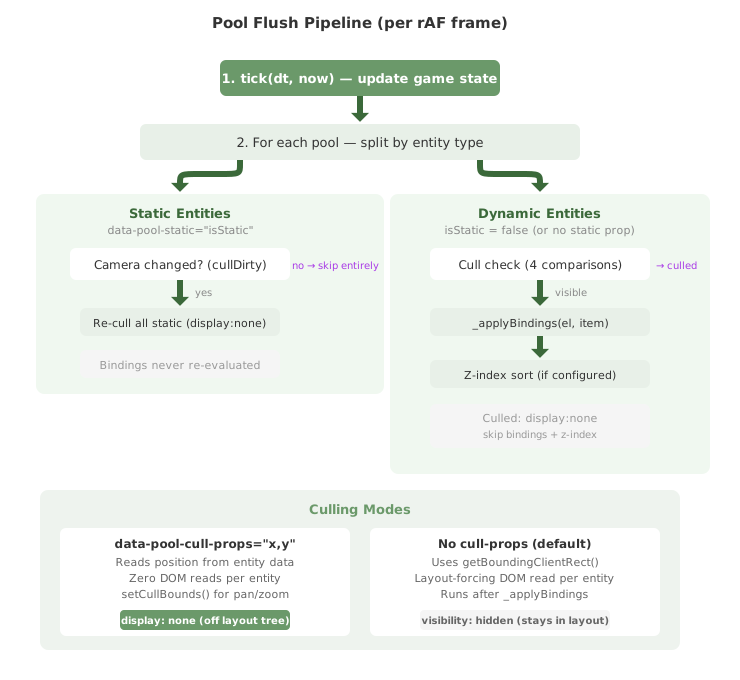
Understanding the pool flush cycle is essential for writing performant pool code. Here is what happens on each animation frame:
- FPS throttle check. If
data-pool-fpsis set, the pool checks whether enough time has elapsed since the last flush. If not, it skips this frame entirely. - tick(dt, now). All component tick hooks fire before flushing, so game state updates are reflected in the same frame.
- Static entity cull (camera-driven). If
data-pool-staticis set, static entities are stored in a separate array. They are only re-culled whensetCullBounds()reports a viewport change, not every frame. Bindings are applied once onadd()and never re-evaluated. - Dynamic entity cull + bind. For each dynamic entity, the cull check runs first (using data properties or
getBoundingClientRect). If culled, the entity is set todisplay: noneand all remaining work is skipped. If visible, bindings are evaluated with per-property change detection. - Z-index sort. If
data-pool-sortis set, each visible entity'sz-indexstyle is updated from the sort property.
Zero-Overhead Architecture
The pool flush path is designed to be as close to hand-written DOM manipulation as possible:
- No Proxy. Entity objects are plain JavaScript objects. No reactive Proxy wrapping, no getter/setter traps, no dependency tracking.
- No object spreads. Entities are mutated in place. No copying, no immutable updates.
- No framework helpers. Bindings call pre-compiled functions directly with the entity object. No expression parsing at runtime, no context resolution.
- Cached element references. Each entity's bound elements are cached in an array at add time (computed from template metadata paths). No
querySelectorcalls during flush. - String comparison guards.
textContent,style.*,className, and attribute values are compared as strings before writing. The browser never sees a no-op DOM write.
This means the flush cost per entity is essentially: one function call per binding, one string comparison, and (only if changed) one DOM property assignment.
Shared rAF Loop
All pools across all components share a single requestAnimationFrame loop. This avoids the overhead of multiple rAF callbacks and ensures all pool flushes happen in the same frame. The loop automatically starts when the first entity is added to any pool and stops when all pools are empty.
CSS Performance Tips
The DOM flush is only half the picture. The browser still needs to style, layout, paint, and composite your entities. These CSS choices have a significant impact on frame rate.
Prefer transform over left/top for Movement
Using left and top triggers layout recalculation. Using transform: translate() only triggers compositing, which is much cheaper. However, for pool entities, the difference is smaller than in typical CSS animation because the pool already batches all DOM writes into a single frame.
For absolute-positioned entities, left/top is simpler and works well for most pool sizes. Switch to transform if you are hitting frame budget limits:
<!-- Simple: left/top (works well for most cases) -->
<template>
    <div class="entity" data-bind-style="{ left: x + 'px', top: y + 'px' }">
        ...
    </div>
</template>

<!-- Optimized: transform (reduces layout thrashing at high entity counts) -->
<template>
    <div class="entity"
         data-bind-style="{ transform: 'translate(' + x + 'px,' + y + 'px)' }">
        ...
    </div>
</template>
Use scaleY Instead of height for HP Bars
Changing an element's height triggers layout. Using scaleY with transform-origin: bottom achieves the same visual effect through compositing only:
/* CSS */
.hp-fill {
    width: 100%;
    height: 100%;  /* Always full height */
    background: green;
    transform-origin: bottom;
    will-change: transform;
}
<!-- Template: scaleY from 0 to 1 based on HP ratio -->
<div class="hp-bar">
<div class="hp-fill"
data-bind-style="{ transform: 'scaleY(' + (hp / maxHp) + ')' }">
</div>
</div>Avoid Expensive CSS Properties
Some CSS properties trigger expensive paint operations on every frame. Avoid these on pool entity elements:
| Property | Cost | Alternative |
|---|---|---|
filter: blur() |
Very expensive per element | Pre-render blurred versions as images |
backdrop-filter |
Very expensive, samples behind | Use a semi-transparent overlay image |
box-shadow (large radius) |
Moderate paint cost | Use a pre-rendered shadow image or smaller radius |
border-radius on images |
Forces clipping on every paint | Pre-crop images to shape, or use clip-path |
opacity changes |
Cheap (compositing only) | Good to use freely |
transform |
Cheap (compositing only) | Good to use freely |
Use will-change Sparingly
will-change: transform promotes an element to its own compositing layer, which makes transform and opacity changes cheaper. However, each promoted layer consumes GPU memory. For pools with hundreds of entities, promoting every entity can exhaust GPU memory and actually decrease performance.
A good strategy is to apply will-change to the pool container rather than to each entity:
/* Promote the container, not individual entities */
[data-pool] {
    will-change: contents;
    contain: layout style;
}
SVG Pre-Rasterization
SVG images are a common source of Chrome performance issues in pool rendering. Chrome re-decodes SVG images on every img.src change, which is devastating for animated sprites. The solution is to pre-rasterize SVGs to bitmap data URIs at load time.
The Problem
If your entities use SVG sprites with frame animation (changing img.src each frame), Chrome must decode the SVG to bitmap on every change. With 50+ entities each changing sprites at 60fps, this completely blows the frame budget.
The Solution
At load time, draw each SVG onto a canvas and extract it as a PNG data URI. Store these in a lookup Map. During the game loop, set imgSrc to the cached data URI instead of the SVG URL.
const spriteCache = new Map();

// Pre-rasterize at load time
async function rasterizeSVG(url, width, height) {
    return new Promise((resolve) => {
        const img = new Image();
        img.crossOrigin = 'anonymous';
        img.onload = () => {
            const canvas = document.createElement('canvas');
            canvas.width = width;
            canvas.height = height;
            canvas.getContext('2d').drawImage(img, 0, 0, width, height);
            try {
                spriteCache.set(url, canvas.toDataURL('image/png'));
            } catch (e) {
                spriteCache.set(url, url); // CORS fallback
            }
            resolve();
        };
        img.onerror = () => { spriteCache.set(url, url); resolve(); };
        img.src = url;
    });
}

// Pre-load all sprites before starting the game
async function preloadSprites() {
    const promises = [];
    for (const sprite of allSpriteURLs) {
        promises.push(rasterizeSVG(sprite, 48, 48));
    }
    await Promise.all(promises);
}

// In the game loop: use cached bitmap instead of SVG URL
function getSprite(url) {
    return spriteCache.get(url) || url;
}

// When updating entity frame:
enemy.imgSrc = getSprite(enemySpriteURLs[enemy.frame]);
This pattern is used in the Tower Defense demo and eliminates the Chrome SVG decode bottleneck entirely.
Architecture Patterns
Separate Game State from Reactive State
The most performant pool architecture keeps all game state as plain JavaScript and only uses WildflowerJS reactive state for UI screens (start, pause, game over). The game loop never touches the reactive system:
wildflower.component('my-game', {
    // Reactive state: only for UI screens
    state: {
        showStart: true,
        showGameOver: false,
        paused: false
    },

    startGame() {
        this.showStart = false;

        // All game state is plain JS, not in this.state
        this._score = 0;
        this._wave = 1;
        this._running = true;

        // Start the game loop
        this._gameLoop();
    },

    _gameLoop() {
        if (!this._running) return;

        // Update all entities: pure JS, no reactive overhead
        for (const e of this.pools.enemies.items) {
            e.x += e.vx;
            e.y += e.vy;
        }

        // Update HUD with direct DOM writes (bypass reactive system)
        document.getElementById('score').textContent = this._score;

        requestAnimationFrame(() => this._gameLoop());
    }
});
Direct DOM Writes for Non-Pool UI
In pool-driven components, use direct DOM writes for HUD elements, FPS counters, score displays, and other UI that isn't part of a pool template:
// Inside a rAF loop: direct DOM write is correct here
document.getElementById('fps-display').textContent = fps;
document.getElementById('entity-count').textContent = pool.items.length;

// DON'T use data-bind for values updated 60x/second inside rAF.
// Reactive bindings add overhead that's unnecessary for display-only
// counters outside the pool's template.
Why: Pool components run a requestAnimationFrame loop that updates pool entities directly. Routing HUD updates through the reactive system (state changes, computed re-evaluation, DOM diffing) adds overhead for no benefit. The values are display-only and change every frame, so direct writes are faster and simpler.
When to use data-bind instead: For values that change in response to user interaction or store updates (not per-frame). KPI cards, form inputs, toggle states: these belong in the reactive system.
Entity Removal During Iteration
The pool uses O(1) swap-with-last removal internally. When removing entities during a game loop tick, always iterate the items array in reverse to avoid skipping elements (the swapped-in element would be missed on forward iteration):
// CORRECT: reverse iteration
const pool = this.pools.projectiles;
for (let i = pool.items.length - 1; i >= 0; i--) {
    const p = pool.items[i];
    if (p.x < 0 || p.x > fieldWidth || p.y < 0 || p.y > fieldHeight) {
        pool.remove(p.id);
    }
}pool.items array order may differ from insertion order due to the O(1) swap-with-last removal strategy. Do not rely on items array order for rendering. Entity position should be driven by data properties, not array index.
Throttle Non-Critical Pools
Not every pool needs to update every frame. Use data-pool-fps to reduce CPU usage for pools where lower frame rates are acceptable:
- Native frame rate (default): player entities, enemies, projectiles, anything the player directly interacts with
- 30fps: damage numbers, status effects, UI indicators
- 10-15fps: background particles, ambient effects, minimap markers
Use Data-Based Culling for Large Worlds
If your game world extends beyond the visible viewport, use data-pool-cull-props to enable high-performance spatial culling. This reads entity position directly from data properties instead of calling getBoundingClientRect(), eliminating layout-forcing DOM reads entirely:
<!-- Data-based culling: reads x,y from entity objects -->
<div data-pool="world-entities" data-key="id"
     data-pool-cull="200" data-pool-cull-props="x,y">
    <template>
        <div class="entity" data-bind-style="{ left: x + 'px', top: y + 'px' }">...</div>
    </template>
</div>

<!-- With per-entity size (for varying-size entities) -->
<div data-pool="world-entities" data-key="id"
     data-pool-cull="200" data-pool-cull-props="x,y,w,h">
    ...
</div>
Data-based culling uses display: none for culled entities, removing them from the layout tree entirely. The cull check runs before binding evaluation, so culled entities skip all JS and DOM work, not just paint. With 20,000 entities and 500 visible, only those 500 have bindings evaluated.
Pannable / Zoomable Worlds
For worlds with a CSS camera transform (pan + zoom), entity coordinates don't map to screen position directly. Use setCullBounds() each frame to tell the pool what region of the world is visible:
function updateCamera() {
    worldEl.style.transform = `translate(${panX}px, ${panY}px) scale(${zoom})`;

    pool.setCullBounds(
        -panX / zoom,                // left edge in world coords
        -panY / zoom,                // top edge
        (-panX + viewportW) / zoom,  // right edge
        (-panY + viewportH) / zoom   // bottom edge
    );
}
The pool tracks whether bounds have changed. Static entities are only re-culled when the bounds update, not every frame.
Entity Recycling
When entities are removed with pool.remove(), their DOM nodes are recycled rather than discarded. The pool maintains a free list of detached nodes (up to 100). When pool.push() is called, it reuses a recycled node instead of cloning the template, eliminating DOM node creation and garbage collection overhead.
This is automatic and transparent. The recycled node's classes, styles, and binding caches are reset to the template's original state before new bindings are applied. This correctly handles CSS animations with forwards fill mode (e.g., death animations that end at opacity: 0).
Use pool.recycleSize to inspect the free list during development.
Static Entities
In large worlds, most entities are static: trees, rocks, buildings. These never change after being added. Use data-pool-static to mark them so the pool skips per-frame binding evaluation entirely:
<div data-pool="world" data-key="id"
     data-pool-cull="100" data-pool-cull-props="x,y"
     data-pool-static="isStatic">
    <template>...</template>
</div>
// Static: rendered once, never re-evaluated
pool.push({ id: 1, x: 100, y: 200, emoji: '🌳', isStatic: true });
// Dynamic: evaluated every frame
pool.push({ id: 2, x: 50, y: 75, emoji: '🐝', isStatic: false });Static entities are stored in a separate internal array. The flush loop only iterates dynamic entities each frame. Static entities are re-culled only when setCullBounds() reports a camera change. This means a world with 20,000 static trees and 500 dynamic bees only processes the 500 bees per frame.
Profiling
Use the browser's Performance panel to identify bottlenecks. The pool flush appears as a series of style and layout recalculations within the rAF callback. Key things to look for:
- Long "Recalculate Style" blocks. Too many class changes or complex CSS selectors on entities. Simplify entity CSS.
- Layout thrashing. Reading layout properties (
offsetTop,getBoundingClientRect()) between DOM writes. The pool system avoids this internally, but your game code might trigger it. - "Decode Image" blocks. SVG re-decoding. Use the pre-rasterization pattern described above.
- Large paint regions. Elements with
filter,box-shadow, or largeborder-radius. Use the alternatives from the CSS tips section.
The Performance panel's "Frames" view shows whether you are consistently hitting your frame budget. At 60fps, each frame has 16.6ms. The pool flush itself typically takes under 1ms for 100 entities. Most of the frame budget goes to browser style/layout/paint.