



Reactivity System
WildflowerJS uses a fine-grained reactivity system that updates the exact DOM nodes affected by a change, with no virtual DOM.
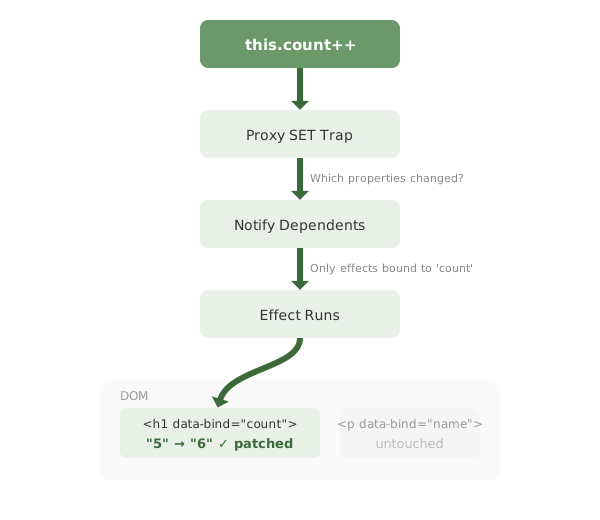
- State is plain JavaScript objects.
- Mutations automatically trigger updates.
- Bindings track the properties they read.
- DOM updates are batched and precise.
Natural JavaScript mutations just work:
this.items.push(newItem)
this.user.name = "Jane"
Multiple changes in the same synchronous block are batched into a single microtask flush: three mutations, one DOM update.
Fine-Grained Reactivity
When you create bindings with data-bind, data-list, or other directives, WildflowerJS creates a small reactive effect for each one. An effect is a function the framework re-runs when the state it read changes. As your code runs, every effect records which state it reads, building a dependency graph that links each piece of state directly to the bindings that depend on it. Effects are the unit of reactivity:
Virtual DOM Approach
- State changes
- Re-render entire component to virtual DOM
- Diff old vs new virtual DOM trees
- Patch real DOM with differences
Fine-Grained Approach (WildflowerJS)
- State changes
- Wake exactly the effects that read that value
- Update only those specific DOM nodes
How It Works
Consider this component with multiple bindings:
<div data-component="user-profile">
    <h1 data-bind="name"></h1>          <!-- effect 1 -->
    <p data-bind="bio"></p>             <!-- effect 2 -->
    <span data-bind="followers"></span> <!-- effect 3 -->
    <span data-bind="following"></span> <!-- effect 4 -->
</div>
wildflower.component('user-profile', {
state: {
name: 'Jane',
bio: 'Developer',
followers: 1000,
following: 50
},
updateFollowers(count) {
// Only effect 3 runs; other DOM nodes are untouched
this.followers = count
}
})When followers changes:
- The write wakes exactly the effects that read the
followersvalue - Only effect 3 (the followers span) re-runs
- The
name,bio, andfollowingelements are not touched - No virtual DOM diffing or component re-render occurs
Ownership and Cleanup
Effects are owned by the component or list row that created them, forming a tree that mirrors your structure:
user-profile (component)
├── effect: name
├── effect: bio
├── list: posts
│   ├── row [0]
│   │   ├── effect: posts[0].title
│   │   └── effect: posts[0].likes
│   └── row [1]
│       ├── effect: posts[1].title
│       └── effect: posts[1].likes
└── effect: showDetails
Ownership is what makes cleanup automatic. There is no registry to scan and no periodic garbage collection:
- Scoped updates: Changing
posts[0].titlewakes only that row's title effect - Efficient cleanup: Removing a list item disposes that row and every effect it owns, in one pass
- Dependency tracking: Cross-component dependencies are edges in the same graph, disposed with their owner
Keyed List Rendering
WildflowerJS uses reactive list reconciliation to minimize DOM mutations. Each list item is tracked by identity, and per-item reactive effects ensure that only changed bindings update.
List Reconciliation
WildflowerJS uses a reactive mapArray approach for list rendering. When the array changes, the framework reconciles by identity, matching existing items by key, detecting adds, removes, and moves, and only touching the DOM for what actually changed:
| Change | What Happens |
|---|---|
| Append | New DOM elements created and appended; existing items untouched |
| Remove | Removed items' DOM elements destroyed; remaining items untouched |
| Reorder | DOM nodes moved to match new order; no re-creation |
| Property change | Per-item reactive effects detect the changed property and update only that binding |
Structural Changes
Adding, removing, and reordering items all go through identity-based reconciliation:
// Append: creates DOM only for new items
this.items.push({ id: 4, text: 'New item' })

// Remove: destroys only the removed item's DOM
this.items.splice(2, 1)

// Reorder: moves existing DOM nodes, no re-creation
const temp = this.rows[0]
this.rows[0] = this.rows[2]
this.rows[2] = temp
Per-Item Property Updates
When you change a property on an existing list item, only that item's affected bindings update; other items are untouched:
// Only the status binding on item 5 updates
this.items[5].status = 'completed'

// Each item's affected binding updates independently
this.items[2].name = 'Updated'
this.items[7].count = 42
<ul data-list="items">
<template>
<li>
<span data-bind="name"></span> <!-- Updated if name changed -->
<span data-bind="status"></span> <!-- Updated if status changed -->
<span data-bind="count"></span> <!-- Updated if count changed -->
</li>
</template>
</ul>Automatic Keyed Rendering
WildflowerJS automatically enables keyed rendering when your list items have an id property. No additional configuration is required:
// Keyed rendering is automatic when items have 'id'
state: {
    users: [
        { id: 1, name: 'Alice' },   // Tracked by id: 1
        { id: 2, name: 'Bob' }      // Tracked by id: 2
    ]
}

// Without 'id', items are tracked by array index
state: {
    tags: ['urgent', 'review', 'done']  // Tracked by index: 0, 1, 2
}
When items have an id property, the framework:
- Tracks each item by identity across array mutations
- Detects adds, removes, and reorders without re-creating DOM
- Preserves DOM state (focus, scroll position, form values) for unchanged items
- Runs per-item reactive effects that update only changed bindings
Why Keys Matter
Consider reordering a list. Without stable keys, the framework must assume items at each index changed:
// Before: ['Alice', 'Bob', 'Charlie']
// After:  ['Charlie', 'Alice', 'Bob']

// Without keys: Updates ALL 3 items (index 0, 1, 2 all changed)
// With keys:    Detects reorder, updates only positions
With keyed items, the framework recognizes that the same items exist in a different order and can optimize accordingly.
Batch Updates
Multiple state changes are automatically batched:
updateUser() {
    // These are batched into a single render cycle
    this.user.name = 'New Name'
    this.user.email = 'new@email.com'
    this.user.role = 'admin'
    // DOM updated once, not three times
}
The framework uses microtask scheduling to batch updates that occur in the same JavaScript execution context.
Cross-Entity Automatic Dependency Tracking
WildflowerJS provides automatic dependency tracking when accessing stores, components, or plugins from within computed properties. The framework detects property access and registers dependencies automatically - no manual subscriptions needed.
Store Access: getStore()
Use wildflower.getStore() in computed properties for automatic store dependency tracking:
// Create a store
wildflower.store('cart', {
    state: { items: [], total: 0 },
    computed: {
        itemCount() { return this.items.length; }
    },
    addItem(item) {
        this.items.push(item);
        this.total += item.price;
    }
});

// Component automatically reacts to store changes
wildflower.component('cart-badge', {
    computed: {
        // Automatic dependency tracking - no subscribe() needed!
        count() {
            return wildflower.getStore('cart').items.length;
        },
        total() {
            return wildflower.getStore('cart').total;
        }
    }
});
When cart.state.items changes, the count computed property automatically re-evaluates and updates the DOM.
subscribe block with this.stores shorthand is the recommended pattern. See Basic Stores for details.
Component Access: getComponent()
Use wildflower.getComponent() in computed properties to read from other components with automatic tracking:
// Source component with state
wildflower.component('theme-manager', {
    state: { mode: 'light', primaryColor: '#007bff' }
});

// Observer component automatically tracks theme changes
wildflower.component('themed-panel', {
    computed: {
        themeClass() {
            const theme = wildflower.getComponent('theme-manager');
            return theme ? 'theme-' + theme.mode : 'theme-light';
        },
        panelStyle() {
            const theme = wildflower.getComponent('theme-manager');
            return theme ? { borderColor: theme.primaryColor } : {};
        }
    }
});
When theme-manager.state.mode changes, all components using getComponent('theme-manager') in their computed properties automatically update.
Plugin Access: $pluginName
Access plugins via wildflower['$pluginName'] with automatic dependency tracking:
// Register a plugin with reactive state
wildflower.plugin({
    name: 'auth',
    state: {
        isLoggedIn: false,
        user: null
    },
    login(user) {
        this.isLoggedIn = true;
        this.user = user;
    },
    logout() {
        this.isLoggedIn = false;
        this.user = null;
    }
});

// Component automatically tracks plugin state
wildflower.component('user-menu', {
    computed: {
        showLoginButton() {
            const auth = wildflower['$auth'];
            return auth ? !auth.isLoggedIn : true;
        },
        userName() {
            const auth = wildflower['$auth'];
            return auth?.user?.name || 'Guest';
        }
    }
});
When the auth plugin's isLoggedIn state changes, all dependent computed properties re-evaluate automatically.
How Automatic Tracking Works
When a computed property is evaluated:
- The framework wraps entity access (
getStore,getComponent, plugin accessors) in tracking proxies - Property accesses on the returned entity are detected
- The component is registered as a dependent of those specific properties
- When those properties change, the computed property is re-evaluated
- Only the specific DOM bindings using that computed property update
init(), you may need to use subscribe() for reactive updates.
Preferred: $ Universal Entity Accessor
Access state from any entity directly in HTML templates. No computed wrappers needed:
<!-- Bind to another component's state -->
<span data-bind="$parent-component.count"></span>

<!-- Bind to a store's state or computed -->
<span data-bind="$my-store.value"></span>
<span data-bind="$my-store.computedTotal"></span>

<!-- Works in all data-* attributes -->
<div data-show="$auth.isLoggedIn">Welcome!</div>
<div data-list="$cart.items" data-key="id">...</div>
Performance Characteristics
Strengths
- Direct dependency edges from state to DOM
- No virtual DOM memory overhead
- Automatic array operation detection
- Zero-config swap and append optimization
- Minimal DOM mutations
Tradeoffs
- Memory for the dependency graph (edges per binding)
- Graph setup when a component first mounts
- Fine-grained tracking adds a small per-read cost, the price of no build step
Best Practices
For Lists
- Always include an
idproperty on list items to enable keyed rendering - Prefer
push()for appending items (triggers append optimization) - Mutate items in place when possible for sparse updates
- Avoid unnecessary array recreation when updating individual items
For General Reactivity
- Keep state flat when possible
- Batch related state changes together
- Use computed properties for derived state
- Leverage the automatic dependency tracking
// Good - mutation triggers sparse update
this.items[idx].completed = true

// Good - push triggers append optimization
this.items.push(newItem)

// Less optimal - full array replacement
this.items = this.items.map(item =>
    item.id === id ? { ...item, completed: true } : item
)