WildflowerJS Reactive JS, No BS*

A no-build reactive JavaScript framework, rooted in the web platform.
No build step. No dependencies. No lock-in.

Latest release: v1.3.0 · see what's new
<script src="wildflower.min.js"></script> ...and start building.

Back to Basics

The code you write is 100% web standard code. HTML stays HTML. JavaScript stays JavaScript. CSS stays CSS. No JSX, no templating language, no custom syntax to learn. If you know the web platform, you already know how to use WildflowerJS.

WildflowerJS extends the web platform. It doesn't replace it.

Your Development Simplified

Because you develop with 100% web standards, every tool in your existing chain already understands the code: IDE, browser DevTools, linter, formatter, screen reader, SEO crawler. Nothing to install, no custom file types, no sourcemaps. Save the file, refresh, and your change is live.

Just be a web developer.

Batteries Included: One Mental Model

Router, SSR, stores, computed properties, two-way binding, event modifiers, data pools, and TypeScript types, all built in, all speaking the same language. Learn data-bind once and you know binding everywhere: lists, pools, stores, forms. There's no five-library stack to keep in sync.

One script tag. Everything you need.

<div data-component="counter">
  <span data-bind="count"></span>
  <button data-action="increment">
    +1
  </button>
</div>

<script>
wildflower.component('counter', {
  state: { count: 0 },
  increment() { this.count++ }
})
</script>

How It Works

data-bind connects state to the DOM.

data-action connects events to methods.

this.count++ triggers a precise DOM update.

Mutate state. The DOM updates.

Two Reactivity Modes

data-list for automatic reactivity: mutate state, DOM updates. data-pool for explicit control: plain objects, zero proxy overhead, you say what changed.

Same template syntax. Different performance profile. From interactive forms to per-frame particle systems. You choose the right tradeoff for the job.

Try it. Right-click, inspect this demo. Every dot is a real DOM element.

See full demo →

* Build Step

Zero Toolchain

Modern frameworks ask you to install a compiler, a bundler, a package manager, hundreds of fragile transitive dependencies, and a framework-specific file format, before you write a single line of your application.

WildflowerJS was built starting from a single principle: no build step, no tooling. Ever.

WildflowerJS asks you to add a script tag.

There's no CLI scaffolding step, no config files, no .vue/.jsx/.svelte source format. You don't debug through sourcemaps or wait on a build pipeline. Your project has zero dependencies.

Performance isn't a tradeoff. Build steps optimize bundle delivery, not the runtime work that follows it. WildflowerJS writes directly to the DOM, with no virtual DOM or reconciliation pass between state change and update, so it doesn't need a build step to be fast.

The framework is full-featured without the toolchain: router, SSR, stores, computed properties, transitions, pools. You don't need a toolchain to use any of it.

my-app/
  index.html
  app.js
  style.css
  wildflower.min.js

That's the entire project. No package.json.
No node_modules. No config files. Ship it.

Zero Install. Zero Attack Surface.

Every dependency you install is trust extended to a maintainer you've never met, running scripts on your dev machine and in your CI. A typical React + Vite + UI‑lib setup pulls in 300+ transitive packages before you write a feature.

Each one is a potential intrusion vector. NPM worms, OAuth chains compromising deploy platforms, postinstall hijacking: the supply chain is now where production code gets compromised, not the deploy. And signing isn't a backstop: Mini Shai‑Hulud (May 2026) compromised 170+ packages whose malicious versions carried valid SLSA Build Level 3 provenance, because the attestation came from build infrastructure the worm had already taken over.

WildflowerJS users don't have this attack surface, by construction. There is no npm install, no postinstall script, no transitive package graph. The framework is one file you copy or pin by hash.

As of v1.1, the same holds for building the framework itself. WildflowerJS bundles with a vendored rollup and terser pipeline pulled as three SHA‑512‑pinned tarballs: no npm install, no transitive packages, no postinstall scripts in the build path. The entire toolchain is three files verified by hash.

Zero dependencies is the absence of a problem the rest of the industry has not properly addressed.

A typical React/Vue project:

  npm install
  ├── hundreds of packages
  ├── from hundreds of maintainers
  ├── postinstall scripts run on install
  └── tens to hundreds of MB of transitive code

WildflowerJS:

  <script src="wildflower.min.js"></script>
  └── 1 file.
      No transitive dependencies.

Zero Compromise

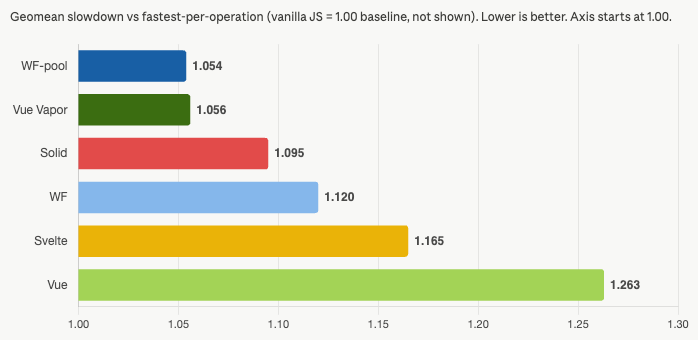
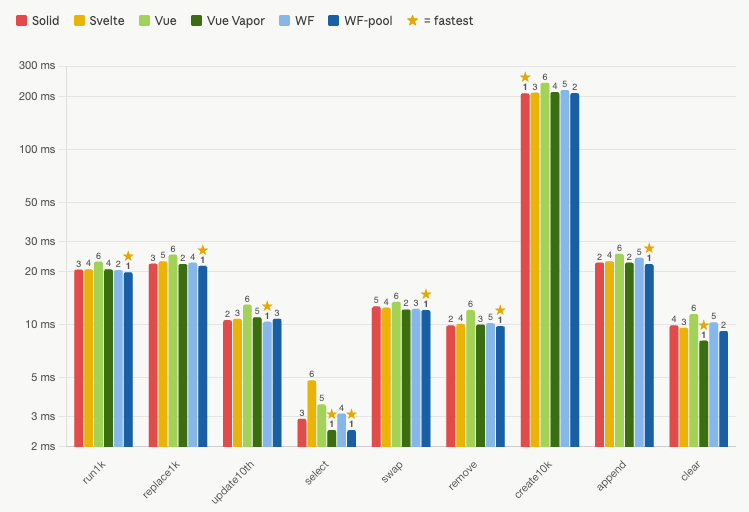
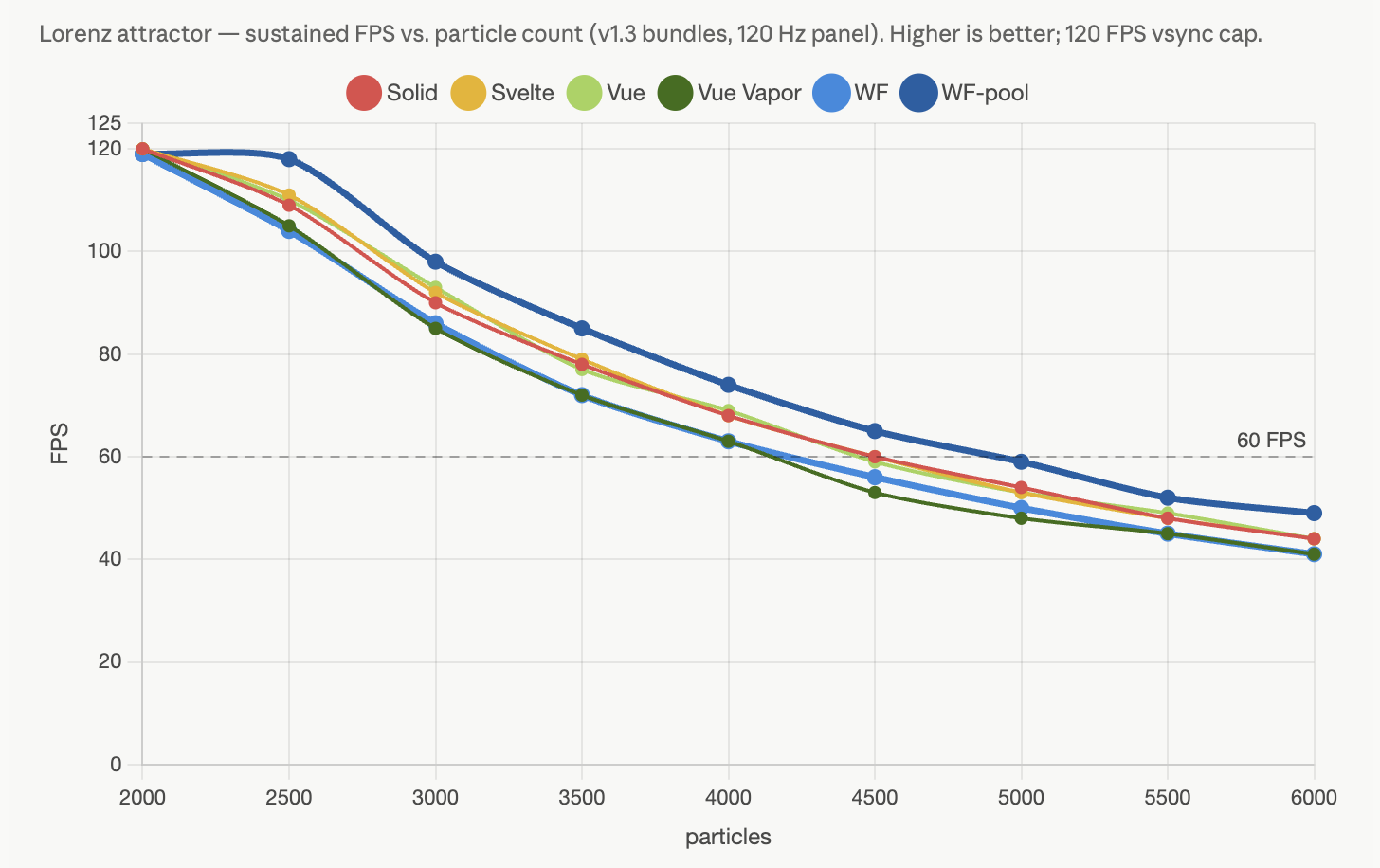
WildflowerJS doesn't compromise performance for ease-of-use. Even with no build step, on the js-framework-benchmark, WildflowerJS performs at the level of frontier frameworks, level with the fastest signal-based frameworks across list creation, updates, selection, swaps, and removal. And for per-frame workloads, data pools lead every framework we tested in our Lorenz attractor simulation demo.

The charts here are the overall geomean standings and the operation breakdown from our latest full-field run, plus the sustained frame rate from our per-frame animation sweep. Click any chart to see it full size.

Delivery is fast too, because there's less to deliver. One file, no framework runtime split across chunks, no hydration pass. Lighthouse scores hold their own against compiled frameworks without a single build artifact.

Simplicity in the interface, performance in the implementation. WildflowerJS doesn't trade one for the other.

Benchmark setup for these charts: js-framework-benchmark operations 1 through 9, 15 samples per cell, all frameworks in a single run; total-duration medians, lower is better. The frame-rate chart runs each framework's fastest variant on the Lorenz attractor for 8 seconds per particle count, fullscreen on a 120 Hz panel; higher is better. Apple M5 Pro, 24 GB RAM, macOS 26.5.2, Google Chrome 150 (stable, headed).

Bar chart of geomean slowdown versus the fastest framework per operation, vanilla JS baseline 1.00: WF-pool 1.054, Vue Vapor 1.056, Solid 1.095, WF 1.120, Svelte 1.165, Vue 1.263. Lower is better.
Geomean slowdown vs fastest per operation. Lower is better.
Grouped bar chart of all nine js-framework-benchmark operations for Solid, Svelte, Vue, Vue Vapor, WF, and WF-pool, with per-operation rankings. WF-pool is fastest on most operations.
All nine operations, side by side. Stars mark the fastest.
Line chart of sustained FPS versus particle count on the Lorenz attractor for Solid, Svelte, Vue, Vue Vapor, WF, and WF-pool. WF-pool holds the highest frame rate at every count, staying above 60 FPS past 4500 particles.
Per-frame animation. Sustained FPS as particle count grows; higher is better.

Zero Lock-in

WildflowerJS works with the DOM, not instead of it. There's no virtual DOM intercepting your code and no compiler rewriting your markup. The render cycle is yours.

That means Leaflet, DataTables, Chart.js, D3, Three.js, any library that touches the DOM, just works. No wrapper packages or framework-specific escape hatches required. Drop in a script tag and use it.

Because your code is standard HTML and JavaScript, you're never locked in. Your skills transfer and your code is more portable. If you outgrow the framework, your knowledge doesn't expire.

This also means your "ecosystem" is all of the world of vanilla JS. Without compromises or hacks.

<!-- Use any library directly -->
<div data-component="map-view">
  <div id="map" style="height: 400px"></div>
</div>
wildflower.component('map-view', {
  state: { lat: 51.505, lng: -0.09 },
  init() {
    // Leaflet works as-is. No wrappers.
    this._map = L.map('map')
      .setView([this.lat, this.lng], 13);
    L.tileLayer('https://{s}.tile.osm.org'
      + '/{z}/{x}/{y}.png').addTo(this._map);
  }
})

Precise Reactivity

When you write this.count++, WildflowerJS updates the single DOM node bound to count. Nothing else is touched. There's no tree diffing or reconciliation pass to figure that out.

You get fine-grained updates and a simple mental model. Change a property, the bound element updates. That's the entire reactivity model.

Other frameworks ask you to learn signals, accessors, memos, effects, and subscription lifecycles to achieve what WildflowerJS does with a property assignment.

wildflower.component('dashboard', {
  state: {
    users: 1420,
    status: 'healthy'
  },
  computed: {
    summary() {
      return this.users + ' users, ' + this.status;
    }
  },
  refresh() {
    this.users = 1421;
    // Only the elements bound to 'users'
    // and 'summary' update. Everything
    // else on the page is untouched.
  }
})

One Reactivity Model. Everywhere.

Components, Stores, and Plugins all share the same reactive foundation. State, computed properties, and methods work identically no matter where they live. Learn it once, it works the same way in a UI component, a global store, or a framework plugin.

Other frameworks make you learn a different system for each layer. React components use hooks, but stores need Redux or Zustand, which are completely different APIs. Vue components use reactive data, but Pinia stores have their own patterns. Every layer is a new mental model.

In WildflowerJS, there's one model. A store is a component without a template. A plugin is an entity that extends the framework itself, adding directives, lifecycle hooks, and services. The same this.count++ triggers the same reactivity everywhere.

This unlocks patterns other frameworks can't express. A store can run headless physics simulations with tick(), feeding data into a component that renders it through a pool, all using the same reactive primitives, no glue code required.

// Component: reactive UI
wildflower.component('cart', {
  state: { items: [] },
  computed: {
    total() { return this.items.length; }
  }
})

// Store: global shared state
wildflower.store('user', {
  state: { name: '', role: 'guest' },
  computed: {
    isAdmin() { return this.role === 'admin'; }
  }
})

// Plugin: extends the framework
wildflower.plugin({
  name: 'notifications',
  state: { items: [], unreadCount: 0 },
  computed: {
    hasUnread() { return this.unreadCount > 0; }
  },
  add(msg) { this.items.push(msg); this.unreadCount++; }
})
// Access globally: wildflower.$notifications.add(...)

// Same state. Same computed. Same methods.

Live Server Data: Built In, Stays True

With WildflowerJS SSR, the page arrives already true. The server (your server, whatever back-end you prefer) renders your data into real HTML, so the first paint is real content, indexable and readable before a line of JavaScript runs. And because the markup is genuine HTML, hydration reads the page's state straight back out of the document. Server-rendered components end up exactly equivalent to client-rendered ones.

v1.3 brings data-query, which does for the rest of the page's life what SSR does for first load. Most frameworks hand you fetch() and leave the rest to you. There's an entire ecosystem of client data libraries that exists to fill that gap. WildflowerJS makes it a declaration instead. Name a source, point an element at it, say how fresh it should stay. Loading and error states, refresh on demand, request racing, and the whole refresh ladder (poll, conditional GET, focus, reconnect, server push) come with it. Oh, and there's no query language. Refinement is an ordinary computed property, and filtering happens client-side without a network round trip.

Together, Wildflower's SSR and data-query tell one story. The server renders the page with real data. Because hydration reads the page itself, there's no flash of empty content, no loading spinner over data the user can already see, and no hydration scripts locking up the main thread. The server's render is the actual UI. When paired with data-query, your SSR becomes the first result of a standing query. The query adopts that markup and keeps it updated from there.

And as you can see in the example, your markup is 100% HTML. From bean to cup, what you see is what you get.

<div data-component="product-board">
  <p data-show="$products.isLoading">
    Loading…
  </p>
  <p data-show="$products.error">
    Failed.
    <button data-action="retry">Retry</button>
  </p>

  <span data-bind="$products.count"></span>
  products

  <tbody data-query="products">
    <template>
      <tr>
        <td data-bind="name"></td>
        <td data-bind="stock"></td>
      </tr>
    </template>
  </tbody>
</div>
// The entire data layer:
wildflower.query('products', {
  from: '/api/products',
  key: 'id',
  refresh: ['focus', 'etag:60']
});

// Server-rendered page? Add data-ssr="true"
// and the markup the server sent becomes the
// query's first result. Live from there.

Data Pools

Every framework wraps collection items in reactive proxies, whether the item needs it or not. WildflowerJS gives you a choice: data-list for push reactivity (automatic), data-pool for pull reactivity (explicit control, zero proxy overhead).

Pools render plain objects with the same template syntax as lists. Mutate the object, call markDirty(), and only that item updates. Full CRUD, selection, bulk operations, all faster than the push-reactive path.

And because pools use pull-based rendering, they scale to simulations, games, particle systems, and data visualizations at native frame rate. Use cases that would choke a virtual DOM. No other framework has anything like this.

<div data-component="user-table">
  <tbody data-pool="users" data-key="id">
    <template>
      <tr>
        <td data-bind="name"></td>
        <td data-bind="status"
            data-bind-class="status === 'active'
              ? 'badge success'
              : 'badge inactive'"></td>
      </tr>
    </template>
  </tbody>
</div>
wildflower.component('user-table', {
  pools: { users: {} },

  init() {
    // Populate: plain objects, no proxies
    data.forEach(u => this.pools.users.add(u));
  },

  // Optional: add tick() and the same pool
  // renders every frame. Same template, same
  // data, different rendering frequency.
  // That's the only difference between a
  // display table and a particle system.
})

Built for AI-Assisted Development

Because WildflowerJS is standard HTML and JavaScript, AI code assistants already know how to write it. There's no custom syntax to hallucinate or compiler quirks to work around. The code an AI generates runs exactly as written, with no build step between generation and execution.

WildflowerJS ships an AI-optimized reference page with patterns, anti-patterns, and examples designed for code generation context windows. Our llms.txt file follows the llms.txt convention for machine-readable documentation.

And for structured app generation, our Universal App Manifest lets you describe an entire application as a JSON schema (components, state, computed properties, methods, templates) and have an AI generate the working code from the manifest, mediated through framework-specific idiom files.

You: "Build me a todo app with
WildflowerJS"

AI reads llms.txt or ai-assistant.html
     ↓
Generates standard HTML + JS
     ↓
<div data-component="todo-app">
  <input data-model="newItem">
  <button data-action="addItem">
    Add
  </button>
  <ul data-list="items">
    <template>
      <li data-bind="text"></li>
    </template>
  </ul>
</div>
     ↓
Open in your browser. It works, and you can read and understand the code.

Freshness and Live Data FULL

Every query answers one question in its declaration. When should this data refresh? The answer is a ladder of options, from a single fetch to a server push stream, all sharing the same state surface and the same safety rules.

The Refresh Ladder

RungDeclarationBehavior
Once'once' (default)Fetch when first observed. Refresh only when asked.
Poll30Refetch every N seconds while the query is on screen.
Conditional poll'etag:60'Re-check every N seconds with a conditional request. The server answers 304 when nothing changed, and no data moves.
Focus'focus'Refresh when the tab regains focus.
Reconnect'reconnect'Refresh when the browser comes back online.
Server push'sse'Hold an EventSource open and apply what the server sends.

Rungs combine as an array. A typical dashboard query reads refresh: ['focus', 'etag:60']. Fresh when the user returns, cheap in the background.

Conditional Requests

When a response carries an ETag header, the query remembers it. Every conditional re-check sends If-None-Match, and a 304 answer costs a round trip with no body, no parsing, and no DOM work. Static file hosts and most API servers do this without any configuration on your part.

A Live Feed Without a Server

Liveness does not require SSE. A function source plus invalidate() turns any event-producing transport into a live query. Here the transport is a simulated in-page feed; in your app it could be a WebSocket or a sync engine:

Live Example A ticker driven by invalidate() Open Full Example ↗
The pattern:
wildflower.query('prices', {
    from: () => feed.snapshot(),   // any transport, any shape source
    key: 'id'
});

// Each transport event invalidates; the engine re-runs the source
// and patches only the rows that changed.
feed.onTick(() => wildflower.getQuery('prices').invalidate());

Server-Sent Events

The 'sse' rung holds a browser-native EventSource open and treats the server as the source of truth for when data changes. Two kinds of message are understood:

  • A message with a JSON body is the new result set. It applies directly, and any fetch already in flight is discarded in its favor.
  • An empty message is an invalidation signal. The query re-checks its from URL conditionally.
wildflower.query('liveItems', {
    from: '/api/items',          // initial load and catch-up fetches
    refresh: 'sse',
    stream: '/api/items/stream'  // dedicated event-stream endpoint
});

The stream option exists because routing a fetch and an event stream through one URL tends to fall apart at proxies and gateways. When your setup does serve both from one URL, omit stream and the query connects to from.

Live Example Server push, and what interruption looks like Open Full Example ↗
Interruption is a first-class state. When the stream drops, the query sets isStale and syncError, keeps every row on screen, and lets EventSource reconnect on its own. The reopen triggers one conditional fetch to catch up on anything missed.

Lifecycle: Active While Observed

A query is active while an element bound to it is in the document. When the last one leaves, the query waits about five seconds, then stands down. Timers stop, listeners detach, streams close, and any request in flight is aborted. The data and the remembered ETag stay put, so if the query is observed again it shows its last results instantly and catches up with a single conditional fetch.

The grace window makes this invisible. Toggling a panel with data-show, switching tabs, and list churn all pass through it without tearing anything down. You do not manage any of this, and there is nothing to configure.